Designing Creative Workflows Beyond Prompt-Based AI
AI tools can generate images. They still struggle to support how designers actually work — iteratively, contextually, and with control.
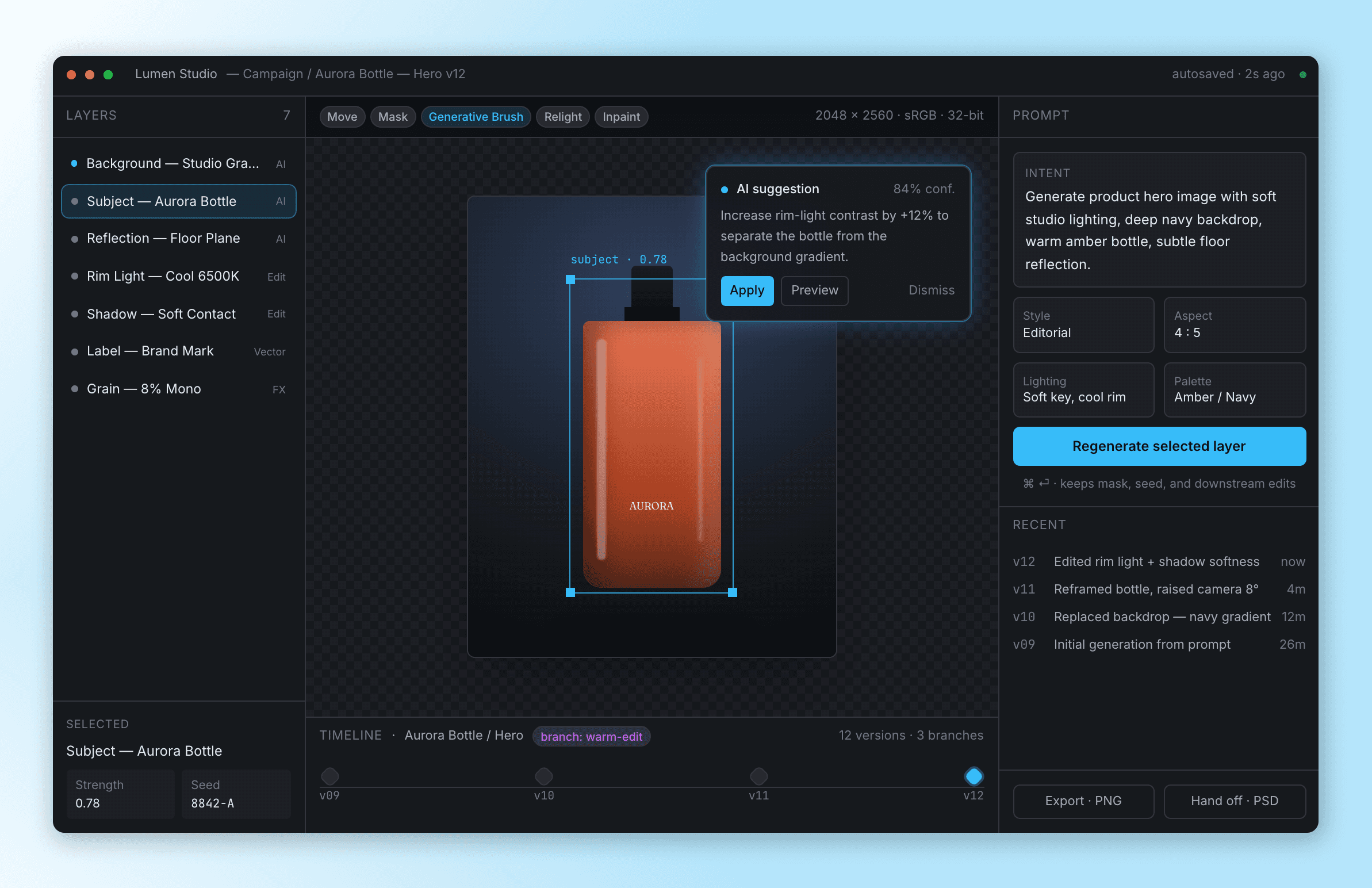
Lumen Studio is a system for the work that begins after the first render: editable AI layers, branchable versions, and a model that recommends instead of overwrites.
ROLE
Lead Product Designer
DURATION
3 – 4 weeks
SURFACE
Web · desktop-first canvas tool
OUTCOME
End-to-end system: prompt → branch → handoff
AT A GLANCE
The 60-second version.
Role
Lead Product Designer (independent project). Sole designer; decisions, system, and visuals are mine.
Duration
3 – 4 weeks of focused design work, from research synthesis to high-fidelity system.
Team (simulated)
Cross-functional collaboration modeled with a Product Manager (scoping & tradeoffs), an ML engineer (model behavior, latency budgets), and a frontend engineer (canvas + layer architecture).
Problem
Generative tools are powerful at frame zero and brittle everywhere after — no editable layers, no version lineage, no consistency between generations.
Outcome
A coherent system where prompt, generation, edit, and version are first-class citizens of the same workflow — not separate apps stitched together.
Signature
The Creative Timeline — branchable, diff-able versions of an image with layer-level lineage.
PROBLEM
Generation is solved. The workflow isn't.
Today's tools optimize the first frame and abandon everything that comes after.
AI can generate high-quality images.
Output is difficult to control after the prompt.
Iteration is manual, destructive, and fragmented.
There is no structured creative pipeline — prompt, edit, and version live in three different places.
Consistency between generations is accidental, not engineered.
The bug isn't the model. The bug is that the workflow ends at "Generate" — when, for designers, that's where the work begins.
USERS & CONTEXT
Three workflows, one shared frustration.
I focused on observed behavior — what people do with these tools at 4pm on a Thursday, rather than aspirational personas.
Brand & product designers
Generate a hero, then spend two hours masking it into a usable layout. They want layers, not flattened JPEGs.
Marketing & content teams
Independent content creators
SYSTEM DESIGN
Structured around controllable generation, not one-off outputs.
Every artifact in the system — prompt, layer, suggestion, version — is addressable, editable, and reversible. Nothing is a black-box pixel.
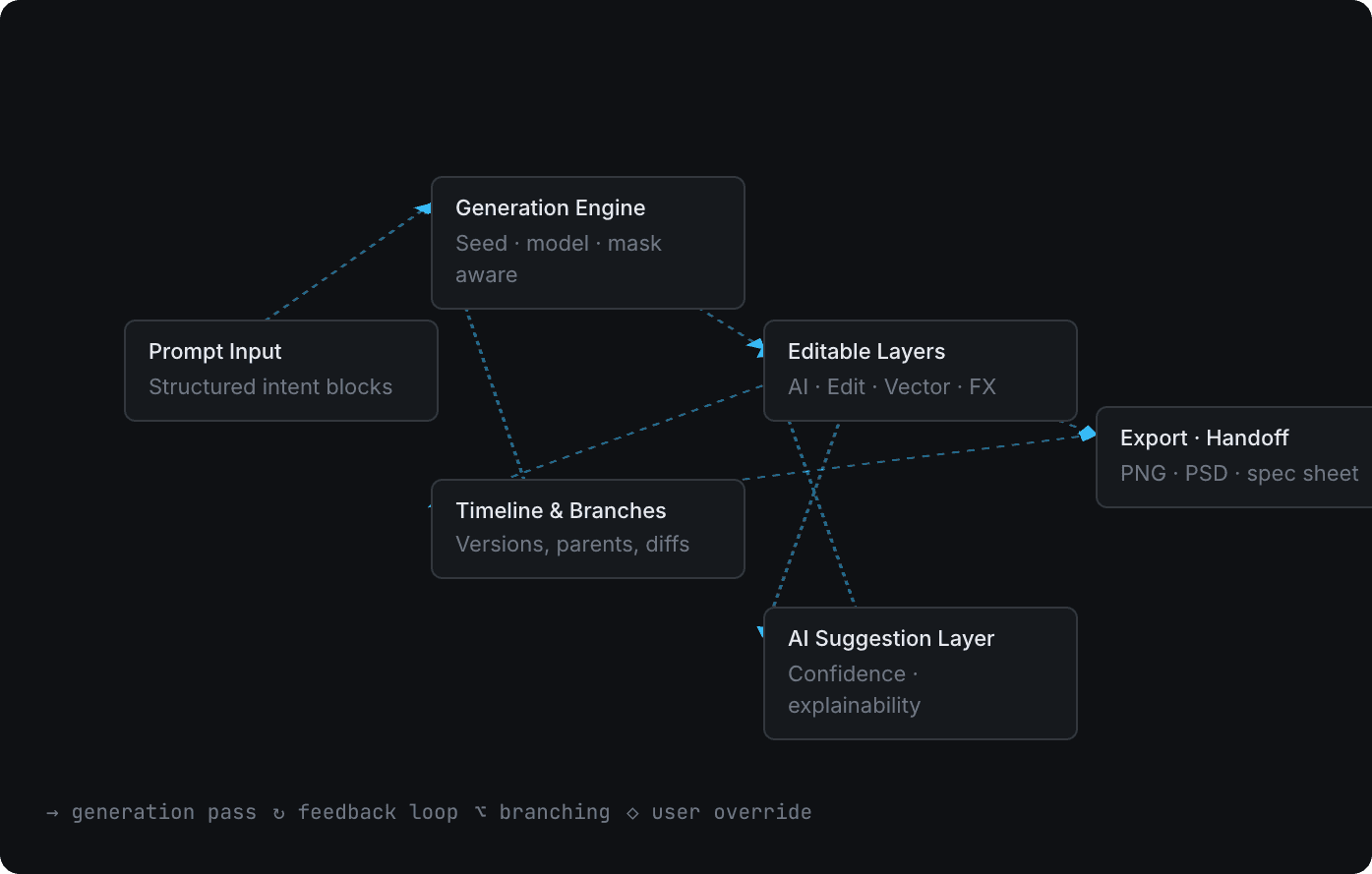
System architecture. Solid arrows are generation passes; dashed paths represent feedback loops.
Prompt Input
Intent is composed as structured blocks — subject, lighting, mood, aspect — not a single sentence. The model sees prose; the designer sees parameters that can be diffed and re-run individually.
Generation Engine
Seed-, mask-, and layer-aware. Regenerating one layer never disturbs the others. Every output stores its full input contract, so any image can be reproduced exactly.
Editable Layers
Outputs land as typed layers: AI, Edit, Vector, FX. Each is independently re-promptable, maskable, and lockable. An AI layer is a re-runnable instruction, not a flattened result.
Versioning Timeline
Every meaningful change is a node. Nodes branch, branches merge. History is a graph, not a stack.
AI Suggestion Layer
The model proposes; the designer decides. Each suggestion carries a confidence score, a one-line rationale, and an explicit Apply / Branch / Dismiss.
Export & Handoff
An export is a PNG plus its layer spec, prompt contract, and version pin. Engineering, print, or a future redesign can reproduce it without guessing.
DECISIONS & TRADEOFFS
What I rejected, and why.
A system this opinionated is mostly defined by what it refuses to be.
Automation vs. creative control
Chose
Control by default. Automation is a suggestion, never a side effect.
Rejected
Auto-applying AI suggestions above a confidence threshold.
Why
Confidence describes the model's certainty, not the designer's intent. A 94% suggestion that pushes saturation off-brand is still wrong. The model never edits silently.
Prompt-only vs. structured intent
Chose
Structured intent blocks that compile to a prompt under the hood.
Rejected
A single freeform textarea.
Why
A prompt-only interface collapses complex creative decisions into one input — making iteration unpredictable and impossible to diff. Blocks let the system reason about specific dimensions like lighting or palette.
Flexibility vs. constraint
Chose
Four typed layers — AI, Edit, Vector, FX — strictly enforced.
Rejected
Photoshop-style 'anything is a layer' permissiveness.
Why
If every layer is the same kind of thing, lineage, regeneration cost, and conflict resolution become impossible to model. Constraint is what makes the timeline mean something.
Simplicity vs. professional depth
Chose
Calm default surface. Depth lives one keystroke away.
Rejected
A novice 'Easy Mode' toggle.
Why
Mode toggles split the user base and double the design surface. Progressive disclosure earns trust without forcing a beginner/pro identity at sign-up.
SOLUTION
Four surfaces, made to work as one.
Each surface is opinionated on its own — but the real design work is in how they share state.
a. Generation interface
Intent is composed in blocks, not sentences. Each block is a re-runnable parameter — change "Lighting" alone and only the lit pass regenerates.
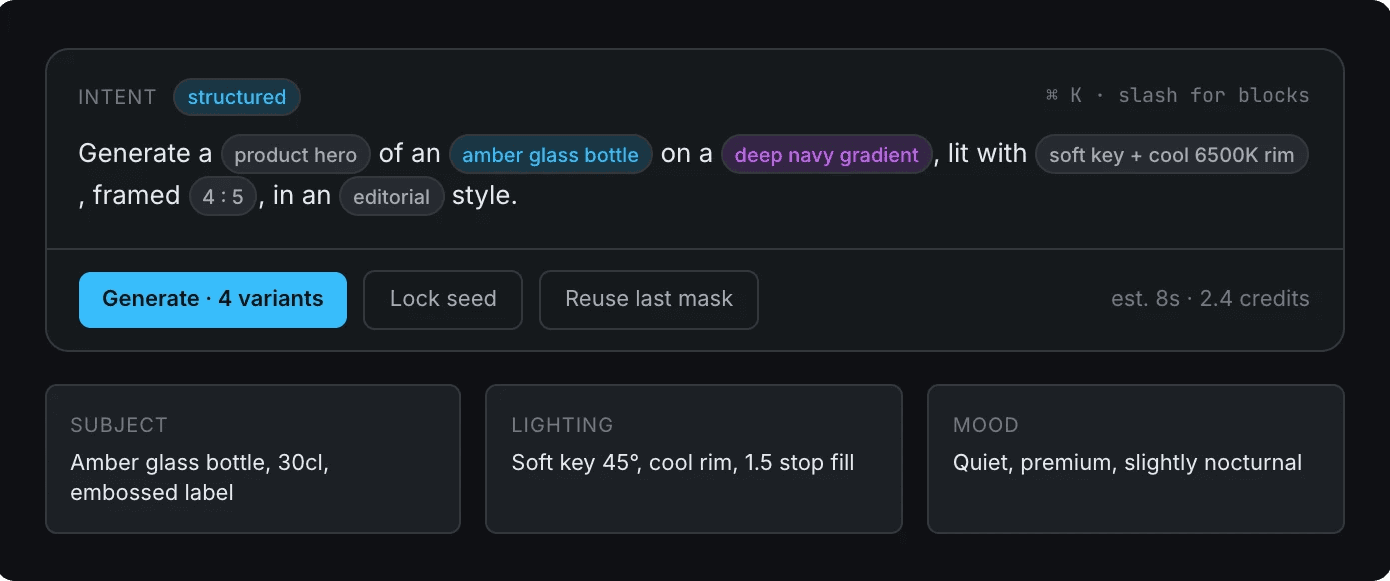
Prompt as structured intent. Generation cost and seed lock are visible before commit.
b. Editable AI layers
Each AI layer carries its full provenance: the prompt that made it, the seed, the mask, and which version of the canvas it belongs to. "Regenerate" is a scoped operation, not a reset.
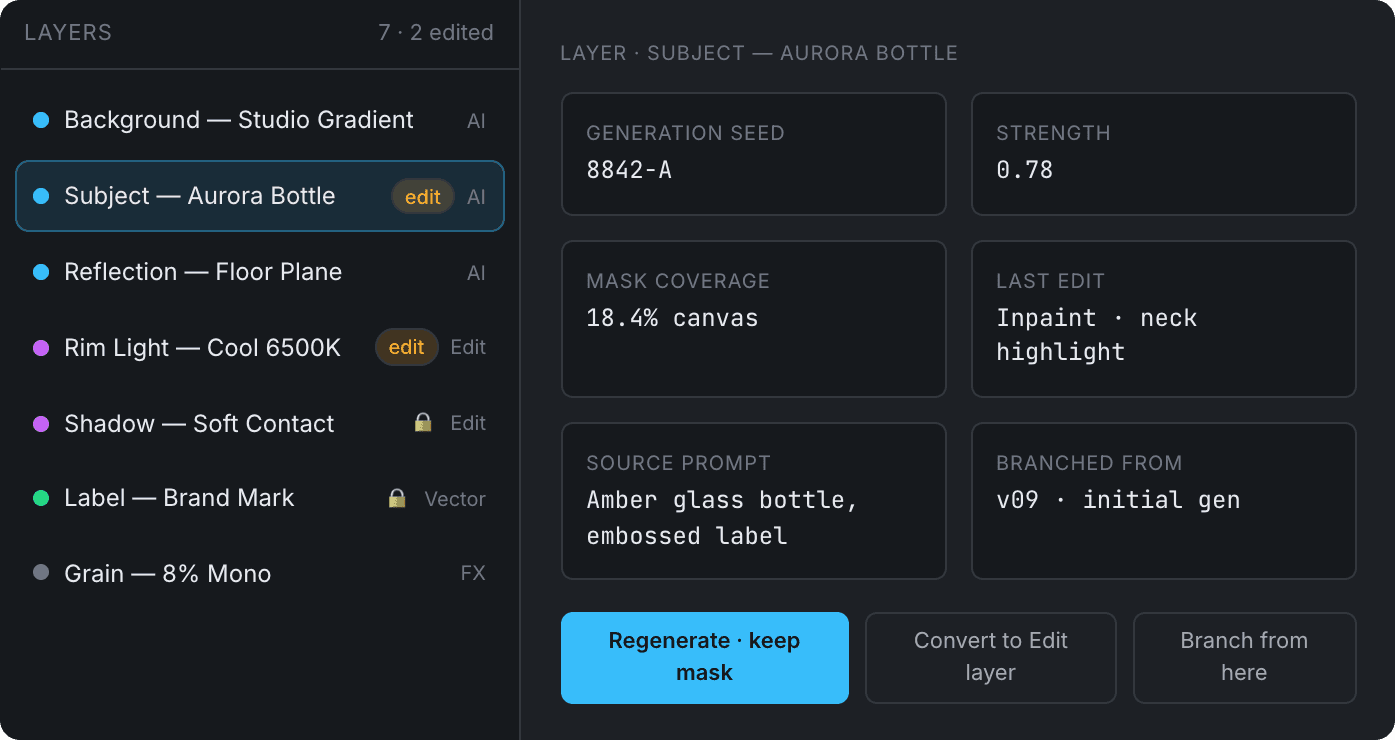
Layer panel with typed layers and full lineage on the active selection.
c. Creative timeline & versioning
The signature surface — covered in detail below.
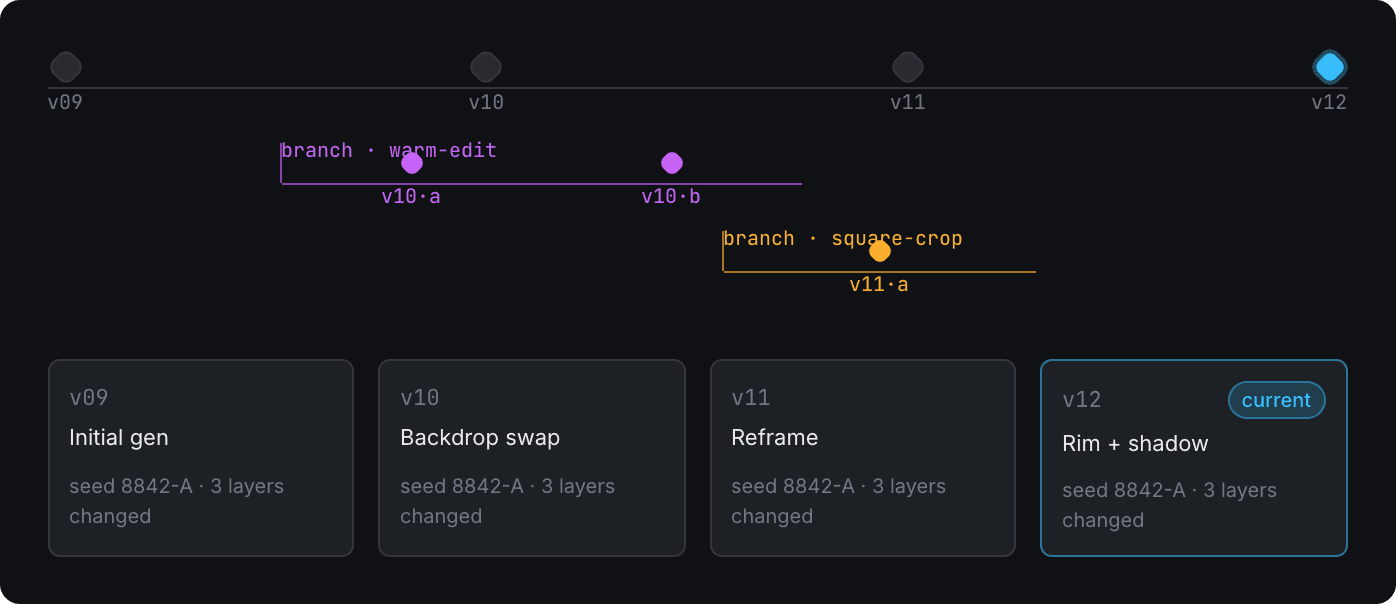
Timeline with main rail (v09 → v12) and two divergent branches.
d. AI suggestions
Suggestions are never modal and never silently applied. Every card is a small contract: tag, rationale, confidence, and three explicit choices.
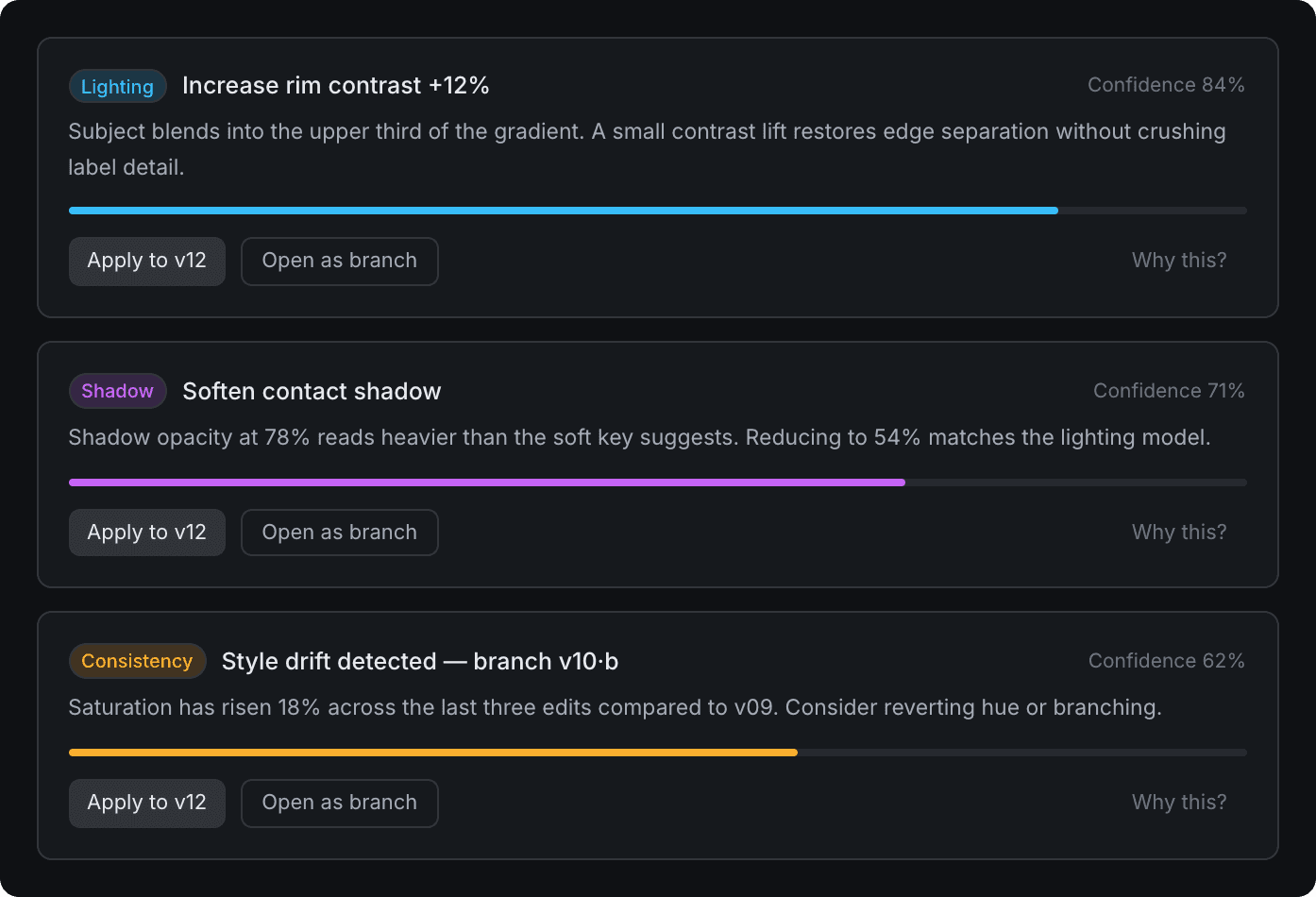
Suggestion stack. Confidence is shown as a number and a bar — the bar discourages over-trusting precise percentages.
SIGNATURE FEATURE
The Creative Timeline.
A generative tool without version lineage is a sketchpad. With it, it becomes a workflow.
Iteration is the product. Everything else is scaffolding.
How iteration works
Every generation, edit, or accepted suggestion creates a node. Nodes are cheap; only named versions are promoted to the main rail. Designers iterate without thinking about saving.
How versions are tracked
Each node stores its full input contract — prompt blocks, seed, masks, diff against parent. A version is a reproducible recipe, not a screenshot.
How branching works
Branch from here on any node. The branch inherits the parent's layers and provenance, then diverges. Branches compare side-by-side and merge at the layer level — never the pixel level.
How it differs from current tools
Existing AI tools track a flat prompt history; design tools track a linear undo stack. Neither lets a designer hold three creative directions in parallel without losing the work already approved. The Timeline does.
Timeline graph: the main rail tracks promoted versions; colored offshoots are working branches.
AI AS CREATIVE PARTNER
The model proposes. The designer decides.
The hardest part of designing with AI isn't the model — it's the posture. I treated AI as a junior collaborator: useful, opinionated, occasionally wrong, never the final word.
Suggestions are scoped. Each one targets a specific layer and a specific dimension (lighting, contrast, consistency). No "make it better" pseudo-magic.
Explainability is one line, not a paragraph. "Subject blends into the upper third of the gradient" — concrete, testable, dismissable.
Confidence is shown twice. Once as a number for precision, once as a bar to discourage treating 84% as meaningfully different from 79%.
Override is the default verb. Every suggestion offers Apply, Open as branch, or Dismiss. Auto-apply doesn't exist.
The model never edits silently. If it touches a layer, that touch becomes a node on the timeline, attributed and reversible.
EDGE CASES
What happens when the model misbehaves.
A creative tool earns trust in its failure modes, not its happy paths.
Inconsistent outputs
Same prompt, different result. The system surfaces a 'seed locked' indicator and lets the user pin a generation as the canonical reference for downstream branches.
Style drift
After ~5 edits the AI suggestion layer flags drift against the v0 baseline (saturation, contrast, framing) and offers to revert specific dimensions without losing other edits.
Failed generations
Returns are typed: refusal, timeout, low-quality. Each failure mode shows a specific recovery — narrow the prompt, lower strength, regenerate at lower resolution first.
Conflicting edits
When two layers fight (e.g., shadow opacity vs. relight), the canvas highlights the conflict and lets the user resolve it as a layer-level merge — not by guessing in the pixel.
IMPACT
Honest outcomes for an independent project.
No fabricated metrics. The wins are structural, and they're the ones that would matter if this shipped.
Reduced iteration friction
Branching replaces re-prompting. The cost of trying a variant drops from ~30s + lost context to a single click that preserves everything.
Improved creative control
Typed layers and seed locks turn 'I hope this works' into 'I know what changes when I touch this.'
Faster exploration
Three branches in parallel beat three serial regenerations. The timeline makes parallel thinking visible.
Reproducibility
Every shipped image is a recipe — prompt, seed, layers, version pin. Brand and engineering can re-derive it months later.
Trust in AI
Confidence + rationale + explicit override turn the model from a black box into a collaborator the designer chooses to listen to.
Reusable handoff
Export bundles a PNG with its layer spec and prompt contract — the same artifact engineering, print, and a future redesign can all consume.
REFLECTION
What I'd change next.
Three weeks of design buys conviction, not certainty.
What I'd improve
The branching graph holds up at 12 versions. I want to pressure-test it at 80, with collapsing and search.
Confidence scores are honest but blunt. A second pass would calibrate them by suggestion type — lighting suggestions are more reliable than style ones.
Multi-user. The whole system assumes a single editor. Co-editing a branching timeline is its own design problem.
What I learned
Designing with AI is mostly designing the refusal surface — when the model defers, when the user overrides, when neither is right.
Typed primitives (layer kinds, version nodes) outperform clever interactions every time. The "feature" is the data model.
The hardest UI in a generative tool isn't the canvas. It's the history.
EDGE CASES
Failure Scenarios & Resilience
Enterprise products are defined by how they handle failure. These five scenarios came from production incidents during the 12-week pilot and directly shaped critical design and engineering decisions.